 Bobbin
The short version
- Choose Bobbin if you want unlimited recordings with no watermark, recordings longer than 30 minutes, and the MP4 file on your computer without signing in to anything.
- Stay with Screencastify if you need share links, built-in editing, captions, a teleprompter, Google Classroom/Canvas/Schoology integration or student video assignments. Bobbin has none of those.
What Screencastify's free plan allows
From Screencastify's own pricing page (checked 22 October 2026), the Free plan includes up to 10 videos (plus 5 per friend you invite, up to 20), recordings up to 30 minutes, a Screencastify watermark, up to 1080p, and MP4/MP3/GIF exports for 5 videos. It also has share links, editing tools and a teleprompter. Paid plans:
- Starter: $7 per user per month billed annually ($19 billed monthly). Unlimited videos, recordings up to 60 minutes, no watermark on new videos.
- Pro: $10 per user per month billed annually ($25 billed monthly). Recordings up to 180 minutes, captions and transcripts, up to 4K, unlimited exports.
- Enterprise and Education: custom pricing for schools and districts.
Screencastify's help centre lists a Google account as a requirement: you sign in with Google and recordings are stored in Google Drive.
Screencastify Free vs Bobbin Free
| Bobbin Free | Screencastify Free | |
|---|---|---|
| Account | Not needed | Google sign-in |
| Number of videos | No limit | 10 (up to 20 with invite bonuses) |
| Recording length | No time limit (your disk space is the limit) | Up to 30 minutes |
| Watermark | None | Screencastify watermark |
| Max quality | 1080p at 30fps | Up to 1080p |
| Get the video file | Yes, every recording: MP4 where your browser supports it, WebM otherwise | MP4/MP3/GIF exports for 5 videos |
| Where videos are stored | On your computer. Nothing is uploaded. | Your Google Drive (via Screencastify) |
| Share link | No. You share the file yourself. | Yes |
| Editing, captions, teleprompter | No | Editing and teleprompter on Free; captions on Pro |
| LMS integrations | No | Google Classroom, Canvas, Schoology |
| Webcam bubble | Yes, in screen and window recordings | Yes |
| Works on Chromebooks | Yes (Chrome 116 or newer) | Yes |
| Paid plan | $4.99/month or $24 once (optional) | From $7 per user/month billed annually |
Competitor facts checked on 22 October 2026 from their own pages: screencastify.com/pricing · Screencastify help: technical requirements. Plans change often; check the linked page before you decide.
Loom, Vidyard, Tella, Tango, Screencastify, Screenity, Zoom and Slack are trademarks of their respective owners. Bobbin is not affiliated with them. Prices and plan limits from their public pages as of 22 Oct 2026.
When Screencastify is the better choice
- You want a link to paste into Google Classroom. Screencastify gives you a share link and integrates with Classroom, Canvas and Schoology. Bobbin gives you a file, which you upload yourself.
- You need students to submit videos to you. Screencastify has a student assignment feature. Bobbin is a personal recorder with no class or team features.
- You edit before sharing. Screencastify has editing tools. Bobbin has no editor; you'd use a separate one.
- You need captions or transcripts. Those are on Screencastify Pro. Bobbin doesn't make them.
- Your district already pays for it. If you have an Education licence, the limits above may not apply to you.
When Bobbin is the better choice
- You record a lot. There is no video cap, so you never have to delete old lessons to make room.
- Your recordings are longer than 30 minutes. Full lectures, workshops and walkthroughs. Bobbin has no time limit.
- You don't want a watermark and don't want to pay to remove it.
- You'd rather not connect an account. Bobbin has no sign-in, no servers for video, no analytics and no trackers. It asks Chrome only for storage, unlimitedStorage and alarms permissions.
- You want the file. Every recording is saved on your computer as you record (written every second, so a crash doesn't lose the take). Upload it to Drive, YouTube or your LMS yourself.
How to switch
- Install Bobbin in Chrome (or Edge or Brave). There's nothing to sign up for.
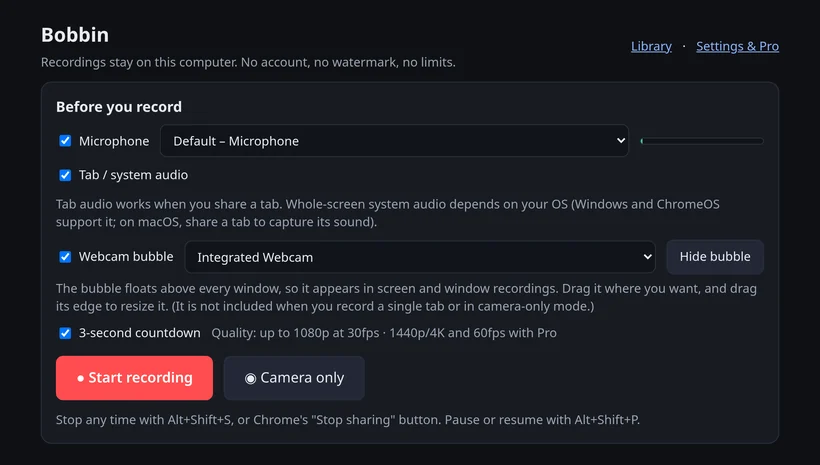
- Click the Bobbin icon, choose Record screen, window or tab, pick your microphone and camera, and start. A 3-second countdown gives you time to get ready.
- Stop with Alt+Shift+S. The recording is in Bobbin's Library; download the MP4.
- Share it the way you share any file: Google Drive, your LMS's upload button, YouTube (unlisted) or email.
Keep Screencastify installed for the videos you already made there; Bobbin doesn't import or host videos. For classroom-specific tips see Screen recorder for teachers.