Founding price: the first 100 buyers get Pro for life at $24 once (then $39).Founding: Pro for life $24 Get notified →
Template pack · 52 scripts

The Async Video Playbook

Copy-paste scripts, timing guides and checklists for short screen recordings that people actually watch. Fill the blanks, record in one take, send.

Checkout opens shortlyRead 3 free scripts

Checkout opens shortly at a $14 launch price (one-time, 7-day refund). Want a heads-up? Email support@getbobbin.app.

  • PDF + Google Docs/Word
  • Sheets library
  • Notion import
  • Works with any recorder
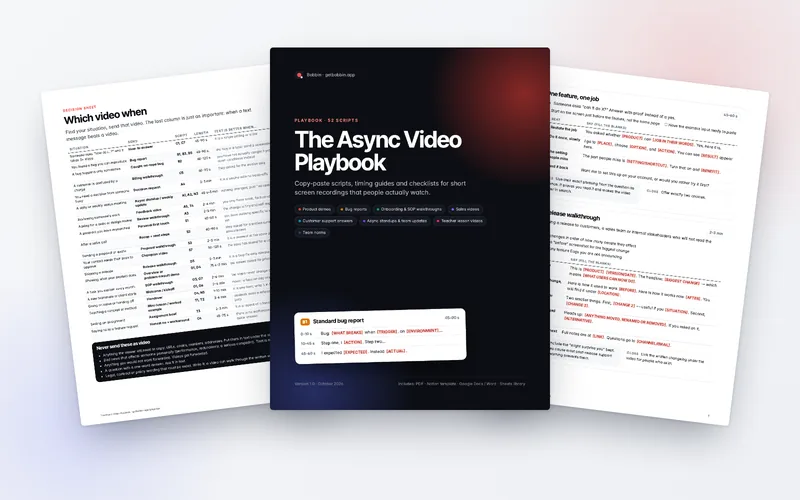
Pages from The Async Video Playbook PDF: the cover, the Which video when decision sheet and a product demo script

Why scripts?

Most screen recordings fail for the same three reasons: the point arrives too late, the viewer is not told what to do next, and the video runs twice as long as it needed to. Every script in the playbook fixes all three with a fixed structure: timed beats, the words to say, and a one-line close. You fill in the brackets and talk naturally around them.

52 fill-in-the-blank scripts

Across 8 situations, each with a length target, set-up checklist, timed beats and a closing line.

"Which video when" sheet

20 common situations, the video to send, and when a plain text message is better.

Timing guide

A 100-word calibration paragraph to measure your speaking pace, and word budgets from 30 seconds to 5 minutes.

Recording checklist

Before, during and after you hit record. Printable.

Title and preview formula

Titles people can find later, preview frames, and subject lines for sending.

Team video norms template

A ready-to-fill page for your wiki: when to record, length caps, naming, reply times.

What's inside

Eight sections, 52 scripts. Every script ID below is in the PDF, the Docs file, the spreadsheet and the Notion import.

Product demos · 7

Show the thing working. Lead with the outcome, not the menu bar.

  • D1 The 90-second product overview
  • D2 One feature, one job
  • D3 New-release walkthrough
  • D4 Problem → workflow → result
  • D5 Personalised demo for one account
  • D6 Setup / integration walkthrough
  • D7 Stakeholder progress demo

Bug reports · 6

A good bug video can be acted on without a single follow-up question.

  • B1 Standard bug report
  • B2 Intermittent bug, caught on tape
  • B3 Visual / layout regression
  • B4 Customer bug, relayed to engineering
  • B5 Slowness / performance report
  • B6 Fix verified / QA sign-off

Onboarding & SOP walkthroughs · 7

Record it once, stop explaining it every month.

  • O1 Day-one welcome for a new teammate
  • O2 Tool tour: where things live
  • O3 SOP: a recurring task, step by step
  • O4 Handover before leave or a role change
  • O5 "How we do X here" — the why and the how
  • O6 Client onboarding kickoff
  • O7 Exception handling: when it goes wrong, do this

Sales & prospecting videos · 7

Short, specific, and obviously recorded for one person.

  • S1 Cold first touch, their site on screen
  • S2 Post-call recap with next steps
  • S3 Proposal / quote walkthrough
  • S4 Re-engage after silence
  • S5 Objection answer
  • S6 Warm intro follow-up
  • S7 Champion enablement: the one they forward to the boss

Customer support answers · 7

Show, don't describe. One video can replace five back-and-forth emails.

  • C1 "Here is how to do it" answer
  • C2 Troubleshooting with checkpoints
  • C3 "We looked into it" — investigation result
  • C4 Honest "we don't do that" + a workaround
  • C5 Billing or invoice walkthrough
  • C6 Escalation handoff
  • C7 Evergreen FAQ answer (reuse it)

Async standups & team updates · 6

Replace status meetings with two minutes people can watch at 1.5×.

  • A1 Daily async standup
  • A2 Weekly update for stakeholders
  • A3 Pull request / design review walkthrough
  • A4 Decision request: options A and B
  • A5 Async feedback on a doc or design
  • A6 Project kickoff brief

Teacher lesson videos · 7

Short, structured videos students can pause, rewatch and revise from.

  • T1 Flipped-classroom mini-lesson
  • T2 Worked example, step by step
  • T3 Assignment brief + how to submit
  • T4 Individual feedback on student work
  • T5 Whole-class feedback: the common mistakes
  • T6 Software or tool tutorial for students
  • T7 Weekly recap for absent students

Team norms: replacing meetings and Loom habits · 5

Videos that set up how your team uses video, so it saves time instead of adding noise.

  • N1 Announcing your async video norms
  • N2 "How to record a good update here" — training
  • N3 This meeting is now a video (agenda video)
  • N4 Replying to a video (reply template)
  • N5 Time-zone handoff before you go offline

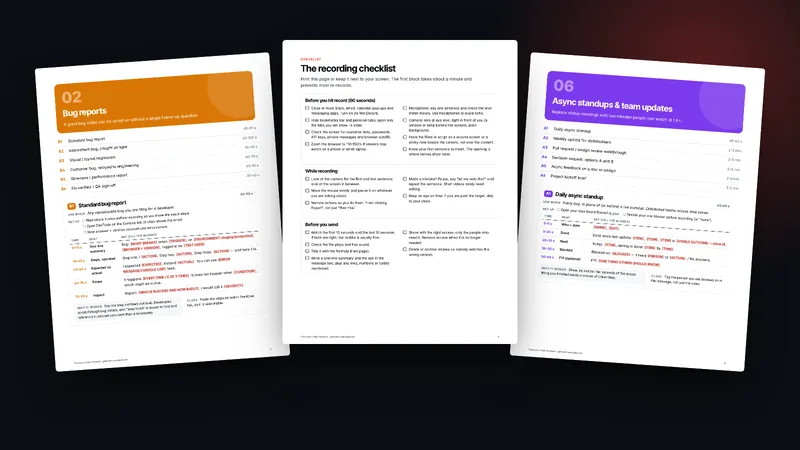
Inside pages: the Bug reports section, the recording checklist and the Async standups section

Free samples

Three scripts from the playbook, free

Use them as they are. If they save you a re-record, the other 49 are the same quality.

B1

Standard bug report

45–90 s

FromBug reports

Use whenAny reproducible bug you are filing for a developer.

Set up

  • Reproduce it once before recording so you know the exact steps
  • Open DevTools on the Console tab (it often shows the error)
  • Note browser + version, account and environment
TimeBeatSay (fill the blanks)
0–10 sOne-line summaryBug: [WHAT BREAKS] when [TRIGGER], on [ENVIRONMENT: staging/production], [BROWSER + VERSION], logged in as [TEST USER].
10–45 sSteps, narratedStep one, I [ACTION]. Step two, [ACTION]. Step three, [ACTION] — and here it is.
45–60 sExpected vs actualI expected [EXPECTED]. Instead [ACTUAL]. You can see [ERROR MESSAGE/CONSOLE LINE] here.
60–75 sScopeIt happens [EVERY TIME / X OF Y TRIES]. It does not happen when [CONDITION], which might be a clue.
75–90 sImpactImpact: [WHO IS BLOCKED AND HOW BADLY]. I would call it [SEVERITY].

Why it worksSay the step numbers out loud. Developers scrub through bug videos, and "step three" is easier to find and reference in a ticket comment than a timestamp.

ClosePaste the steps as text in the ticket too, so it is searchable.
A1

Daily async standup

45–60 s

FromAsync standups & team updates

Use whenEvery day, in place of (or before) a live standup. Distributed teams across time zones.

Set up

  • Open your task board filtered to you
  • Decide your one blocker before recording (or "none")
TimeBeatSay (fill the blanks)
0–5 sWho + date[NAME], [DAY].
5–20 sDoneDone since last update: [ITEM], [ITEM]. [ITEM] is [VISIBLE OUTCOME — show it].
20–35 sNextToday: [ITEM], aiming to finish [ITEM] by [TIME].
35–50 sBlockedBlocked on: [BLOCKER] — I need [PERSON] to [ACTION]. / No blockers.
50–60 sFYI (optional)FYI: [ONE THING OTHERS SHOULD KNOW].

Why it worksShow, do not list: ten seconds of the actual thing you finished beats a minute of ticket titles.

CloseTag the person you are blocked on in the message, not just the video.

S1

Cold first touch, their site on screen

45–60 s

FromSales & prospecting videos

Use whenA first message to a prospect you have researched. Their website or LinkedIn on screen proves it is not a blast.

Set up

  • Open their website on the page most relevant to your pitch
  • Find one specific, true observation (a job post, a page, a product launch)
  • Camera bubble on: people reply to faces
TimeBeatSay (fill the blanks)
0–8 sName + proof of researchHi [FIRST NAME], I made this for you after looking at [THEIR PAGE/POST].
8–25 sThe observationI noticed [SPECIFIC OBSERVATION]. Usually that means [LIKELY CHALLENGE].
25–45 sRelevant proofWe help [SIMILAR COMPANY TYPE] with exactly that: [ONE-SENTENCE RESULT you can back up].
45–60 sLow-friction askWorth a [15]-minute chat? If not, a "no thanks" is genuinely fine.

Why it worksScroll to the specific thing you mention while you mention it. The visual proof of research does more than any sentence about it.

CloseMake "no" easy; it raises reply rates and saves you chasing.

Checkout opens shortly

Which video when (excerpt)

The first 8 of 20 rows from the decision sheet.

SituationSendScriptLengthText is better when…
Someone asks "how do I…?" and it takes 3+ stepsHow-to answerC1, C745–90 sit is a single setting or a link
You found a bug you can reproduceBug reportB1, B3, B545–90 sthe bug is a typo; send a screenshot
A bug happens only sometimesCaught-on-tape bugB260–120 syou have not actually caught it yet; write down conditions instead
A customer is confused by a chargeBilling walkthroughC560–90 sthey asked for the invoice only
You need a decision from someone busyDecision requestA42–3 minit is a yes/no with no trade-offs
A daily or weekly status meetingAsync standup / weekly updateA1, A2, N345 s–3 minnothing changed; post "no update" in text
Reviewing someone's workFeedback videoA5, T42–4 minyou only have small, factual edits
Asking for a code or design reviewReview walkthroughA32–5 minthe change is tiny and self-explanatory
Also from Bobbin

For engineering and QA teams: The Bug Report & QA Kit

Bug report templates for GitHub, Jira and Linear, an S1–S4 severity guide, release QA checklists and bug-video scripts.

Record them with Bobbin

A free recorder that keeps the file

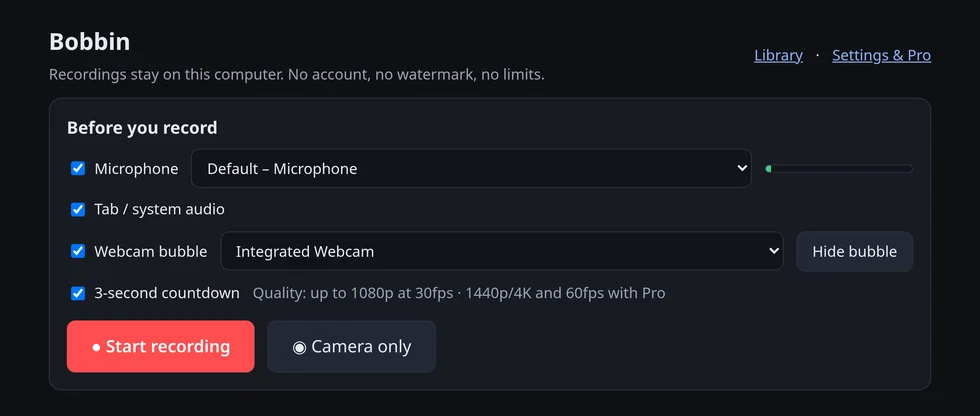
Bobbin is our free Chrome extension for screen and webcam recording. No watermark, no time limit, no account, and your videos are saved on your computer, not uploaded. The playbook works with any recorder; Bobbin is just the one we built.

The Bobbin recorder in Chrome

Questions

What exactly do I get?

A designed The Async Video Playbook PDF (41 pages, US Letter), an editable Word / Google Docs version, the full script library as a Google Sheets / Excel CSV (with Status, Owner and Link columns), and a Notion import (markdown pages plus a CSV database). You get the download links by email straight after payment.

Do I need Bobbin to use it?

No. The scripts work with any screen recorder: Loom, Zoom, QuickTime, OBS or Bobbin. We make Bobbin, a free Chrome screen and webcam recorder that saves videos to your computer, so the playbook mentions it once at the end.

Who is it for?

Anyone who sends short recordings for work: founders and product people doing demos, engineers and QA filing bug reports, ops and team leads writing SOPs, salespeople, support teams, remote teams replacing status meetings, and teachers recording lessons.

Can my team use one copy?

Yes. One purchase covers you, or one team of up to 10 people at one organisation, including commercial work. You may not resell or publicly share the files.

What if it is not useful?

Email support@getbobbin.app within 7 days of paying and we refund you in full, no reason needed. See the Refund Policy.

How do I get it into Notion?

Unzip the Notion file, then in Notion use Settings → Import → Text & Markdown for the pages, and Import → CSV for the Script Library database.

Is the price in dollars, and is tax included?

Yes, US dollars. Tax such as VAT or GST may be added at checkout depending on where you live. Dodo Payments, our merchant of record, handles the payment, invoice and tax.

Stop re-recording. Start with a script.

52 scripts, one-time purchase, instant download, 7-day refund.

Checkout opens shortly

Checkout opens shortly at a $14 launch price (one-time, 7-day refund). Want a heads-up? Email support@getbobbin.app.