 Bobbin
Quick answer
Keep it under 2 minutes: Yesterday (show what you finished), Today (what you'll work on), Blockers (who you need). Record your screen with your webcam in the corner, download the file, and post it in the team thread. A 2-minute 1080p recording is about 8 MB, small enough for Slack or Teams.
The 2-minute template
| Section | Time | What to show |
|---|---|---|
| Yesterday | ~30 s | The merged PR, closed ticket or finished design |
| Today | ~30 s | The ticket or doc you're starting |
| Blockers | ~20 s | The error, the question, and who can help |
| Anything else | ~10 s | A heads-up: time off, a demo, a risk |
Showing beats telling: a five-second look at the actual PR or chart answers questions that would otherwise become a thread.
Recording it
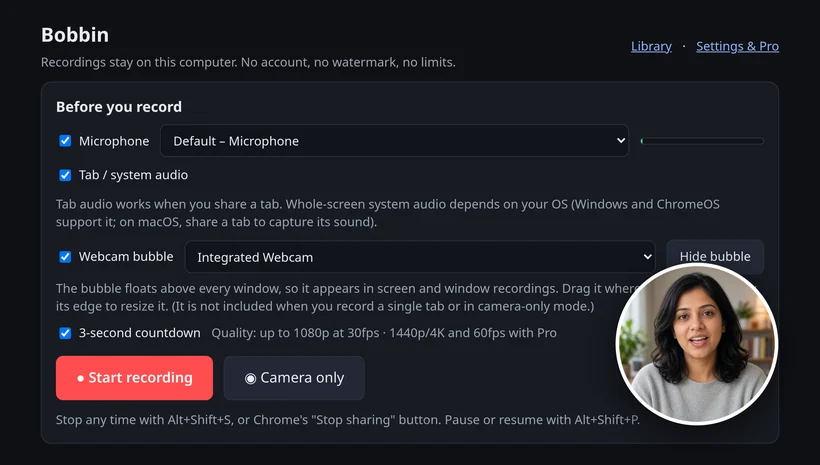
- Click the Bobbin icon in Chrome's toolbar and choose Record screen, window or tab.
- Pick your microphone and turn on the camera if you want the webcam bubble.
- Press Start recording, choose what to share in Chrome's picker, and wait for the 3-second countdown.
- Pause with Alt+Shift+P, stop with Alt+Shift+S, then press Download to save the file.
- Share a window or the entire screen so your webcam bubble is in the video (it doesn't appear in single-tab recordings).
- Use Pause (Alt+Shift+P) while you switch to the next thing to show.
- Fluffed it? Discard the take and start again; nothing is kept.
- Pro's custom file names (like "Standup {date}") keep a week of standups tidy. Free is enough for everything else.
Sharing it
Bobbin saves an MP4 on your computer and doesn't make share links, so post the file itself. Slack accepts files up to 1 GB; a 2-minute 1080p recording is about 8 MB at our measured rate. For a recurring channel thread, upload each day's file as a reply.
When another tool is better: if your team wants a shared video library with comments, reactions and view counts, a hosted tool such as Loom fits better. Bobbin doesn't host videos or make share links, and it has no editing, transcripts, comments, viewer analytics, team workspace or mobile app.
Checked on 23 October 2026: Slack Help: Add files to Slack. File size from our own 60-minute 1080p test (≈246 MB/hour).
Loom, Vidyard, Tella, Tango, Screencastify, Screenity, Zoom and Slack are trademarks of their respective owners. Bobbin is not affiliated with them. Prices and plan limits from their public pages as of 22 Oct 2026.