 Bobbin
Quick answer
- Free, no account, keeps the file: Bobbin or Screenity (Chrome), or your computer's built-in recorder.
- Free with share links: Loom Starter (5-minute, 25-video limits) or Vidyard Free.
- Want Tella-style editing? Stay with Tella, or use Loom Business + AI for editing by transcript.
First: what Tella costs
Tella's pricing page lists Pro at $13 and Premium at $19 per user/month with annual billing (it shows 50% off for annual, so monthly billing costs more). Every new workspace gets a 7-day Pro trial and there is no forever-free plan; after the trial, recording, editing and exporting are locked until you subscribe. Paid plans include up to 4K, 6-hour clips, transcription in 106 languages and timeline and transcript editing.
At a glance
| Tool | Free plan | Paid from | Where videos live | Editing |
|---|---|---|---|---|
| Bobbin (Chrome) | Yes: no time or video limit, no watermark, no account | $4.99/month or $24 once (optional) | Your computer (MP4) | None |
| Screenity (Chrome) | Yes: free, open source, local recording | Cloud editor is the paid part | Your computer | Trim, drawing, blur |
| Loom | Starter: 5-minute recordings, 25 videos, 720p | Business $18 per user/month | Loom's cloud | Trim and stitch (Business); AI editing (Business + AI) |
| Vidyard | Free: limited videos per month, no download | See vidyard.com/pricing | Vidyard's cloud | Basic |
| Screencastify | Free: 30-minute recordings, watermark | Starter $7/month (annual) | Cloud + Drive | Basic |
| Built-in recorders (ChromeOS, macOS, Windows) | Yes, built in | n/a | Your computer | None |
| Tella | No (7-day trial) | Pro $13 per user/month (annual) | Tella's cloud | Full editor |
1. Bobbin: free, keeps the file on your computer
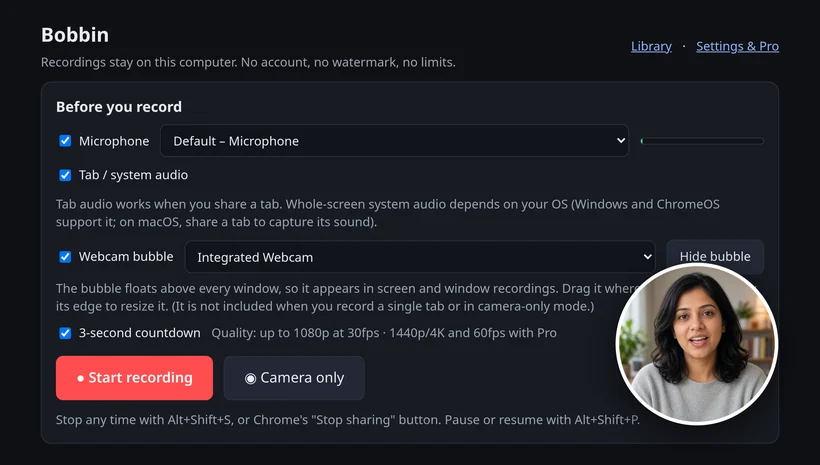
A Chrome extension that records your screen, a window or a tab with a floating webcam bubble (or just your camera) and saves an MP4 where your browser supports it. Free has no time limit, no video limit, no watermark and no account; nothing is uploaded. Works in Chrome, Edge and Brave on Windows, macOS, Linux and ChromeOS. Trade-off: Bobbin doesn't host videos or make share links, and it has no editing, transcripts, comments, viewer analytics, team workspace or mobile app. Best when you need the raw recording as a file, free.
2. Screenity: free and open source
A free, open-source Chrome recorder that saves locally, with drawing, blur, a cursor spotlight and trimming. Its cloud editor is the paid part. Best when you want annotation tools without paying.
3. Loom: free plan with share links
Loom Starter is free with 25 videos per person, 5-minute screen recordings and up to 720p; downloading is a Business feature. Business is $18 and Business + AI $24 per user/month (checked 25 October 2026). Best when you send quick video messages as links and want comments and view counts. Details: Loom pricing explained · Tella vs Loom.
4. Vidyard: free plan for sales videos
Vidyard Free records screen and camera into Vidyard's cloud with a monthly video limit and no download on the free plan (see our Vidyard page for the exact limits). Best when you send sales videos and want viewer tracking.
5. Screencastify: popular in schools
Screencastify Free gives you up to 10 videos (plus 5 per friend you invite, up to 20), recordings up to 30 minutes, a Screencastify watermark, up to 1080p, and MP4/MP3/GIF exports for 5 videos. Starter is $7/month billed annually. Best when your school already licenses it. See Screencastify alternative.
6. Your computer's built-in recorder
ChromeOS has Screen capture (Shift+Ctrl+Show windows), macOS has the Screenshot toolbar (Shift+Command+5) and Windows 11 has Snipping Tool's screen recording. All are free and save a file. Best when you need a quick recording without installing anything. Shortcuts: screen record shortcut for every OS.
7. Or stay with Tella
If you publish polished videos (courses, launch videos, YouTube tutorials), Tella's layouts, transcript editing and silence removal are what you pay for, and none of the free tools above replace them.
How to choose
- Need the file, free, private: Bobbin or Screenity.
- Need a link people watch right away: Loom or Vidyard.
- Need an edited, polished video: Tella.
Checked on 25 October 2026: tella.com/pricing · loom.com/pricing. Checked on 22 October 2026: Tella help: How the 7-day free trial works · Tella help: Plans · screenity.io/extension · vidyard.com/pricing · Vidyard help: Video usage and length limits in Vidyard Free · screencastify.com/pricing · Chromebook Help: Take a screenshot or record your screen. Plans change; check the linked pages.
Loom, Vidyard, Tella, Tango, Screencastify, Screenity, Zoom and Slack are trademarks of their respective owners. Bobbin is not affiliated with them. Prices and plan limits from their public pages as of 22 Oct 2026.