 Bobbin
Ask first. A screen recorder doesn't show Zoom's or Meet's recording notice. Say you're recording at the start, get agreement, and follow your organisation's rules and local law.
Quick answer
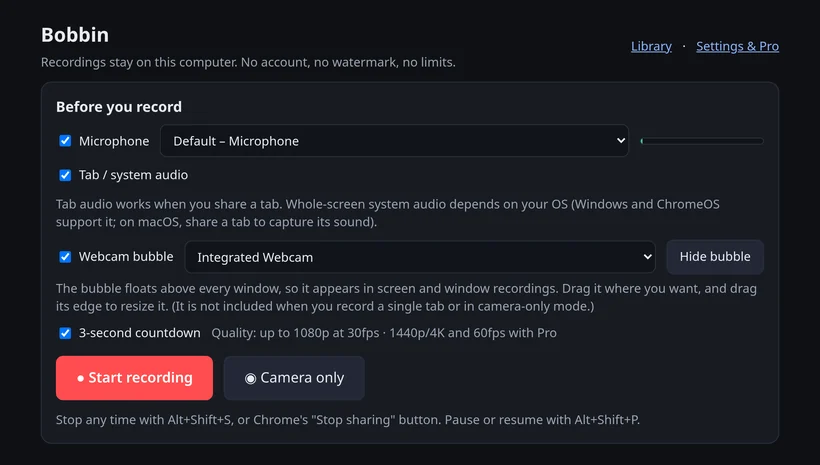
Join the call in a Chrome tab (Meet, or Zoom's web client). In Bobbin tick Microphone and Tab / system audio, press Start recording, pick the meeting tab with share tab audio on. Wear headphones. Stop with Alt+Shift+S, then Download. Free, no account, no time limit.
What it can and can't do
| Bobbin (free extension) | |
|---|---|
| Record other people's voices | Yes: tab audio in any OS; whole-screen system audio on Windows and ChromeOS |
| Record your voice | Yes, your microphone, mixed into the same file |
| Any Zoom or Google account, host or not | Yes: it records what your screen shows |
| Time limit | None (your disk space) |
| Output | MP4 where your browser supports it, WebM otherwise, on your computer |
| Joins as a bot / records when you're absent | No |
| Transcripts, meeting notes, summaries | No |
| Audio-only file | No: it records video too |
| Phones and tablets | No: Chrome on a computer only |
Record Google Meet
- Join at
meet.google.comin a Chrome tab. - Click the Bobbin icon → Record screen, window or tab. Tick Microphone and Tab / system audio; untick Webcam bubble (Meet already shows your camera).
- Press Start recording, choose the Meet tab, keep share tab audio on.
- Stop with Alt+Shift+S and press Download.
Meet's own recording (eligible paid Workspace and Google One plans) saves to the organiser's Drive and notifies everyone. More: record Google Meet for free.
Record Zoom
- Zoom in the browser: join from the web client (
app.zoom.us/wc) in a Chrome tab and follow the same steps: share that tab with tab audio on. - Zoom desktop app on Windows: share the Entire screen and turn on Also share system audio.
- Zoom desktop app on a Mac or Linux: Chrome can't capture whole-screen system audio there, so join from the browser instead, or use Zoom's own recording.
- Chromebook: Zoom records to the cloud only; see record Zoom on a Chromebook.
Zoom's local recording needs the desktop app and host permission; cloud recording needs a paid licence (Zoom support, checked 22 October 2026).
Tips for clean call recordings
- Headphones. With speakers, your mic picks the call up a second time.
- Share the tab, not the screen, to keep notifications and other windows out of the video.
- Do a 5-second test and play it back before an important call. If it's silent: fix no audio.
- Long calls: about 250-275 MB per hour at 1080p in our tests, so check your free disk space.
Checked on 25 October 2026 from their own pages: Google Meet Help: Record a video meeting · Zoom support: local recording · Zoom support: cloud recording · Zoom support: Zoom on Chromebook / web app. Plans change; check the linked page before you decide.
Loom, Vidyard, Tella, Tango, Screencastify, Screenity, Zoom and Slack are trademarks of their respective owners. Bobbin is not affiliated with them. Prices and plan limits from their public pages as of 22 Oct 2026.