 Bobbin
Quick answer
- Any computer with Chrome: a Chrome extension with a webcam bubble, such as Bobbin (free, no account, saves a file), Screenity, Loom or Screencastify.
- Chromebook only: the built-in Screen capture tool has a Front Camera switch.
- Windows 11: Clipchamp's Screen & Camera recorder, or a Chrome extension.
- Mac: the Screenshot toolbar (Shift-Command-5) has no camera option, so use a Chrome extension.

What is a bubble screen recorder?
It is a screen recorder that shows your webcam as a small floating circle (the "bubble") on top of whatever you are recording. Because the bubble is on your screen, it is recorded together with the screen into one video, so there is nothing to line up later. It is the format people know from Loom-style video messages, tutorials and recorded presentations.
Two things decide whether the bubble ends up in your video:
- What you share. The bubble is part of the screen, so share your entire screen or the window it floats over. If you share a single browser tab, the tab is captured on its own and the bubble isn't in it.
- Staying on top. The bubble floats above other windows; exactly how it behaves over full-screen apps depends on your operating system.
Free bubble recorders, by computer
| Tool | Works on | Bubble | Where the video goes | Account |
|---|---|---|---|---|
| Bobbin (Chrome extension) | Chrome, Edge, Brave on Windows, Mac, Linux, ChromeOS | Floating, drag and resize | File on your computer (MP4 where supported) | No |
| Screenity (Chrome extension) | Chrome | Camera bubble, backdrop or blur | Your device or Google Drive | No (only for its editor) |
| Loom | Chrome extension and desktop apps | Camera bubble | Loom's cloud | Yes |
| Screencastify | Chrome extension | Webcam embed | Screencastify's cloud / Drive | Yes |
| ChromeOS Screen capture | Chromebooks | Front Camera switch | Downloads (.webm) | No |
| Clipchamp Screen & Camera | Windows 11 / browser | Camera recorded with screen | Your Clipchamp project | Yes |
Free-plan limits differ a lot: Loom Starter stops at 5-minute recordings and 25 videos, and Screencastify Free at 10 videos of up to 30 minutes with a watermark. See Loom's free plan limits and is Screencastify free?
Set up a bubble recording in Chrome (Bobbin)
- Add Bobbin to Chrome from the Chrome Web Store (free, no account).
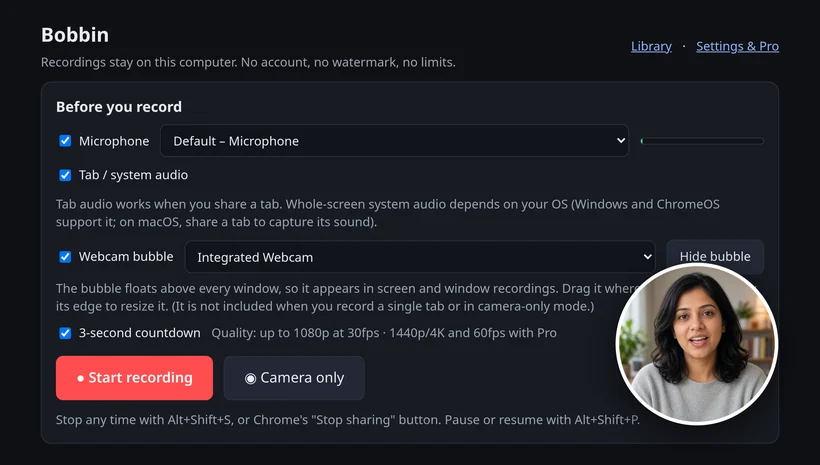
- Click the Bobbin icon → Record screen, window or tab. Tick Webcam bubble and Microphone; tick Tab / system audio if you need computer sound.
- Press Start recording and pick Entire screen (or a window) in Chrome's picker.
- Drag the bubble to a corner and resize it. Pause with Alt+Shift+P; stop with Alt+Shift+S.
- Press Download. You get an MP4 where Chrome supports it (Chrome 126+), WebM otherwise.
Free: no watermark, no time limit, up to 1080p at 30 fps, and nothing is uploaded. Every second is saved as you record, so a crash doesn't lose the take. Just want your face, no screen? Use camera-only mode. Optional Pro is $4.99/month or $24 once (founding price) for 1440p/4K and 60 fps where your screen and computer support it, bubble styling, an auto-stop timer and custom file names, with a 7-day refund. Founding price for the first 100 buyers. Then $39 lifetime / $5.99 per month.
Bobbin doesn't host videos or make share links, and it has no editing, transcripts, comments, viewer analytics, team workspace or mobile app.
Bubble tips
- Leave a corner empty. Put the bubble where your content isn't, usually bottom right, and keep it there.
- Camera at eye level, light in front of you, not a window behind you.
- Look at the lens for your key points; it reads as eye contact.
- No bubble in the video? You shared a single tab. Start again and share the entire screen or the window.
- Black bubble? Another app (a video call) is using the camera. Close it and try again.
Step-by-step guides: record screen and webcam in Chrome · Chromebook with webcam · Windows 11 with webcam.
Checked on 26 October 2026 from their own pages: screenity.io/extension · Loom help: Starter plan FAQ · screencastify.com/pricing · Chromebook Help: Take a screenshot or record your screen · Microsoft Support: Clipchamp screen recording. Plans and settings change; check the linked page before you decide.
Loom, Vidyard, Tella, Tango, Screencastify, Screenity, Zoom and Slack are trademarks of their respective owners. Bobbin is not affiliated with them. Prices and plan limits from their public pages as of 22 Oct 2026.